

Table of Contents
 Set as a preferred Google source
Promotions mark key milestones in your career, proving your value to employers and boosting your appeal to recruiters. Learning how to show a promotion on a resume helps mid-level professionals with 2-10 years of experience stand out in India’s competitive job market. ATS-friendly resume format makes it simple to highlight these achievements, ensuring your career progression stands out to top recruiters. Job switchers can craft standout resumes that capture internal promotions or senior role transitions using modern tools. This approach boosts interview calls significantly.
Why Showing a Promotion on Your Resume Matters
Here is why showing a promotion matters for career growth:
Shows career growth & trust
Highlighting promotions demonstrate a clear upward trajectory, proving that past employers invested in your development. Recruiters see this as evidence of loyalty and long-term potential, making you a safer hire.
Signals high performance
Promotions indicate you exceeded expectations, outperforming peers consistently. This reassures hiring managers of your ability to deliver results under pressure.
Improves recruiter confidence
A visible promotion path builds instant credibility, reducing skepticism about your skills. Recruiters spend 7-10 seconds scanning resumes, where clear growth grabs attention first.
Helps ATS ranking
ATS systems scan keywords like “promoted to” and structured timelines; ranking resumes higher when they match job description criteria (ATS parse 75%+ of applications before human review). Optimized formats ensure you pass initial screens.
How to Show a Promotion on A Resume (3 Best Ways)
Choose formats based on role similarity and changes in responsibilities. These methods keep your resume concise while highlighting progression.
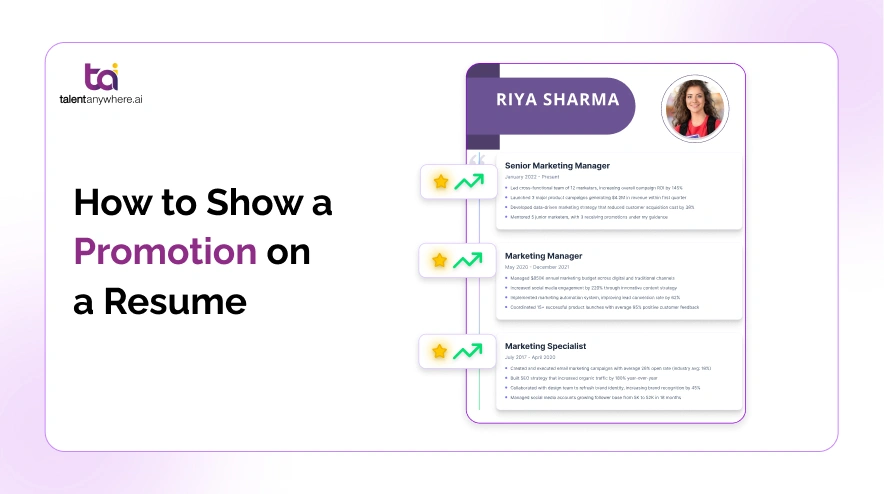
Stacked Entries Format (Best for Clear Growth)
Stack roles under one company header for linear advancement in the same department. List the newest role first with full details, then prior roles without repeating company info.
Use this when responsibilities evolved gradually, from coordinator to manager. It emphasizes steady growth without cluttering.
Example:
Promoted for leading key projects and optimizing code efficiency.
- Developed scalable microservices, reducing load times by 40% and handling 2x traffic.
- Mentored 5 junior engineers, improving team velocity by 25%.
- Integrated CI/CD pipelines, cutting deployment errors by 30%.
- Built full-stack applications using React and Node.js, serving 10K+ users monthly.
- Collaborated on database migrations, enhancing query speed by 35%.
- Contributed to open-source tools, gaining 500+ GitHub stars.
Separate Entries Format (Best for Role Changes)
Treat distinct roles as individual entries, even under the same company. This works for department shifts or gaps followed by promotion.
Ideal for showcasing diverse skills, like moving from sales to sales management. Repeat the company details to clarify progression.
Example:
Returned after an external stint, promoted for proven revenue growth.
- Led 12-person team to exceed targets by 150%, generating ₹5Cr in new business.
- Implemented CRM strategies, boosting conversion rates by 28%.
- Trained staff on negotiation, reducing churn by 15%.
- Closed deals worth ₹2Cr annually, surpassing quota by 120%.
- Built client relationships, expanding portfolio by 30 accounts.
Combined Entry Format (Best for Similar Roles)
Group similar roles under one block with dates per title. Summarize achievements collectively to save space.
Best for minor title upgrades with overlapping duties, like specialist to senior specialist.
Example:
- Promoted twice for patient care excellence and team leadership, managing 20+ staff shifts.
- Reduced readmission rates by 22% through protocol improvements.
- Coordinated emergency responses, handling 500+ cases yearly with 98% satisfaction.
How to List Promotions (Step-by-Step)
Follow these steps for clarity and impact:
Step 1: Add Company Name Once
Place the company name, location, and total employment span at the top of the section to avoid repetition across multiple roles. This creates a clean, professional look while clearly showing your tenure. Recruiters immediately grasp your loyalty to one employer. For stacked entries, format “Company Name | City, State | Start Date – Present” to frame the promotion story effectively.
Step 2: List Roles in Reverse Chronological Order
Begin with your most recent or highest-level role, bolding the job title for emphasis, then work backward to earlier positions. This mirrors standard resume flow, drawing eyes to your current expertise first. Use consistent indentation to visually separate promotions, making progression obvious at a glance without cluttering the page.
Step 3: Mention Dates Clearly
Include precise month and year for each role, like “Jan 2023 – Present,” aligned in italics under the title. Overlapping dates can highlight parallel growth but avoid ambiguity; recruiters and ATS need exact timelines to verify continuity. This precision builds trust and prevents questions during interviews.
Step 4: Add Achievements for Each Role
Craft 3-5 targeted bullet points per position, focusing on new responsibilities gained post-promotion. Start with strong action verbs and tailor to the job you’re targeting, shift emphasis from execution in junior roles to leadership in senior ones. This demonstrates evolving impact, not just duties.
Step 5: Use Metrics to Show Impact
Back every achievement with quantifiable results, such as “Boosted sales by 35% (₹5Cr revenue)” or “Reduced turnaround by 40%.” Numbers prove value concretely, outshining vague claims. Indian recruiters prioritize data-driven pros. Metrics provide concrete proof of impact, boosting interview chances by 40% per studies. Prioritize metrics from promotion periods to underscore your growth.
Resume Examples Showing Promotions
Real-world samples tailored for Indian professionals. Use a free resume builder for ATS-friendly versions.
Example 1: Marketing Role Promotion
Promoted to oversee campaigns after driving 50% lead growth.
- Managed ₹1Cr budget, achieving 2.5x ROI via Google Ads.
- Grew social media following 100K, boosting engagement by 40%.
- Executed SEO strategies, improving rankings for 200+ keywords.
- Analyzed data to refine content, increasing traffic 60%.
Example 2: Software Engineer Promotion
- Promoted for architecting app backend serving 1M users.
- Optimized algorithms, cutting costs by 25% (₹10L savings).
- Led Agile sprints, delivering features 20% ahead of schedule.
Example 3: Sales Promotion (With Metrics)
- Promoted after hitting 140% of targets consistently.
- Expanded territory sales from ₹3Cr to ₹7Cr annually.
- Negotiated deals with 50+ dealers, up to 35% retention.
Best Practices for Showing Promotions on Resume
Here are things you can do to show your promotions on your resume in the best way possible:
Use action verbs (promoted, advanced, elevated)
Start bullets with dynamic verbs like “Promoted to lead team” or “Advanced to manager role.” These grab attention, convey achievement naturally, and signal growth to recruiters scanning quickly.
Quantify achievements
Include numbers like “Grew revenue 35%” or “Managed 15-person team.” Metrics provide concrete proof of impact, making your contributions memorable and credible over vague descriptions.
Highlight increasing responsibility
Show progression by contrasting roles, e.g., “Executed tasks” in junior vs. “Led strategy” in senior. This demonstrates evolving skills and readiness for higher positions.
Keep formatting clean & consistent
Use uniform fonts, bold titles, italic dates, and consistent bullets. Clean layout ensures readability for recruiters and ATS compatibility without visual distractions.
Common Mistakes to Avoid When Listing Promotions on a Resume
Here are some common mistakes that you should avoid:
Not clearly showing promotion
Failing to visually separate roles or note the advancement buries your growth story. Recruiters miss the progression, assuming a stagnant career. Use stacked formats, bold titles, and phrases like “Promoted to” to make promotions pop immediately.
Using inconsistent dates
Vague ranges like “2020-2023” or mismatched formats confuse timelines and raise red flags. Always use month/year consistently, e.g., “Jan 2022 – Present,” for every role. This builds trust and helps ATS parse your history accurately.
Listing only latest role
Omitting prior positions hides context for your promotion, making achievements seem isolated. Include 2-3 bullets from earlier roles to show evolution; recruiters value the full journey, not just the endpoint.
No achievements per role
Generic duty lists like “Handled sales” ignore impact, blending you with others. Add 3-5 quantified bullets per position to prove value added post-promotion. Tailor to the target job for relevance.
Overloading responsibilities
Cramming 10+ bullets per role overwhelms readers as recruiters scan a resume in 7 seconds or less. Limit to top 4-5 achievements, focusing on promotion-driven wins. Prioritize quality metrics over exhaustive task dumps.
Promotions in Different Scenarios
Here is the list of scenarios and how you can show your promotions:
Same Role, Higher Title
Use stacked entries with the new title prominent. Note “Title upgraded for performance” in the senior role’s first bullet. This clarifies minor advancement without separate blocks, keeping focus on continuity.
Role Change Promotion
Create separate entries for each distinct role, repeating company details. Highlight new skills gained, e.g., “Shifted to management, leading a 10-person team.” This showcases versatility and growth across functions.
Multiple Promotions in One Company
Stack all roles chronologically under one header, bolding each title with dates. Group similar achievements; use “Progressed through 3 roles” summary if space is tight. Emphasizes loyalty and rapid ascent.
Internal Transfer + Promotion
Combine transfer and promotion in stacked format: “Transferred to [Dept] and promoted to [Title].” Detail cross-functional wins to show adaptability. Avoids confusion while proving internal success.
ATS Optimization Tips
Here are the tips to make your resume ATS-friendly:
Use keywords like “promoted to,” “advanced to,” “elevated to”
Incorporate these naturally in job descriptions or first bullets, e.g., “Promoted to Senior Developer for 40% efficiency gains.” ATS scans for career progression signals, boosting your match score instantly.
Avoid tables/images
Stick to plain text, standard bullets, and simple formatting as ATS can’t parse graphics or complex layouts. talentanywhere.ai online resume builder ensures scannable, text-only structures that pass filters effortlessly.
Match job description keywords
Mirror phrases from the target JD, like “led cross-functional teams” post-promotion. This aligns your resume semantically, improving rankings. Test compatibility with the free ATS checker tool.
When NOT to Show Promotions Separately
There are scenarios where showing promotion separately is not advisable. Here are some situations:
Short-term roles
Skip detailing promotions lasting under 6 months as they dilute your resume’s focus. Summarize as “Various roles, [Company] (2023)” to avoid signaling instability while preserving space for impactful experience.
Minor title changes
Tiny tweaks like “Analyst I to II” don’t warrant separation. Combine under primary title with note: “Progressed to Senior Analyst.” Keeps narrative clean without overemphasizing insignificant shifts.
Irrelevant positions
Omit old promotions from unrelated fields (e.g., retail for tech roles). List under “Additional Experience” briefly to show work ethics without distracting from the current career trajectory.
Quick Checklist
Clear promotion path
Use stacked entries or bold titles to visually map progression from junior to senior roles. Recruiters spot growth instantly.
Correct dates
List month/year precisely for each role, e.g., “Mar 2022 – Present.” A consistent format prevents timeline confusion and builds recruiter trust immediately.
Metrics included
Quantify every bullet: “Grew sales 35%,” not “Handled sales.” Numbers prove impact, making promotions credible and memorable to hiring managers.
ATS-friendly format
Plain text, standard headings, no tables/graphics. talentanywhere.ai provides a resume builder that auto-formats for seamless ATS parsing and higher pass rates.
Consistent structure
Uniform fonts, spacing, bold/italics across roles. Clean design enhances readability, ensuring your promotions stand out professionally.
Conclusion
Promotions serve as concrete proof of your professional growth, demonstrating to recruiters that you’ve earned trust and delivered results over time. They carry a strong impact on hiring decisions, as busy Indian recruiters scanning hundreds of resumes prioritize candidates with clear career progression. Your promotions instantly signal high performance and reliability. Proper formatting ensures these achievements shine, dramatically boosting your chances of selection by passing ATS filters and grabbing human attention in seconds.
Build a resume that highlights your career growth using ATS-friendly structures to showcase promotions effectively and improve your odds of getting hired. talentanywhere.ai Resume Builder simplifies this.
Create a standout resume today that turns your promotions into interview opportunities! Sign up for free.
FAQs
How do I show multiple promotions on the same resume?
What if my promotion was recent?
Does showing promotions help with ATS?
How many bullets per promoted role?
talentanywhere.ai Blog
Build professional resumes with AI, improve your ATS score, and apply with confidence. talentanywhere.ai empowers job seekers with smarter resume creation and career tools for every stage.